 Quicksloth
A Fixed Widget alternative that keeps your settings
Last updated: 28 October 2026
For WordPress sites that use Fixed Widget (q2w3) to keep a sidebar widget or an ad in view and have seen the notice on its listing. Quicksloth Sticky Widget reads the Fixed Widget settings on activation (margins, stop elements, custom elements, minimum screen sizes), and the widgets and blocks you marked stay sticky: nothing to redo. Below, the two plugins side by side, option by option, using only what Fixed Widget's public listing and code say.
Quicksloth Sticky Widget is free in the WordPress.org Plugin Directory since 28 October 2026.
Fixed Widget in short
On 22 October 2026 the WordPress.org listing of "Fixed Widget and Sticky Elements for WordPress" (slug q2w3-fixed-widget, published under the account monetizemore, with its homepage on wpadvancedads.com) showed version 6.2.3, last updated on 30 March 2023, tested up to WordPress 6.2.14, in the directory since November 2012, with more than 70,000 active installations and an average of 4.7 out of 5 from 262 ratings (232 five-star, 12 four-star, 4 three-star, 2 two-star, 12 one-star). At the top of the listing WordPress.org shows this notice:
"This plugin hasn't been tested with the latest 3 major releases of WordPress. It may no longer be maintained or supported and may have compatibility issues when used with more recent versions of WordPress."
The current WordPress release on the same day was 7.1.3. We do not know the plans of Fixed Widget's authors, and the plugin may be updated again; what we can say is what its listing says, and its active installation count shows that many sites still run it. Its own description reads "Fixed Widget is completely free of charge", and its settings page has a "Recommended Integration" box for Advanced Ads, published from the same WordPress.org account (monetizemore). The listing also says it has been translated into 24 locales, and its most recent reviews, from August 2026, are five-star.
Where the two differ
- Updates. Fixed Widget's last update is from March 2023 and its listing carries the notice above. Quicksloth Sticky Widget is new: it is tested with WordPress 7.1, and we plan to test it with each major WordPress release and keep its "Tested up to" current. It has no track record and no reviews yet.
- Blocks. Both handle blocks. Fixed Widget adds "Fix widget" and "Stop widget" to the block editor and stores them as the classes
FixedWidget__fixed_widgetandFixedWidget__stop_widget; ours adds a Sticky panel with the Sticky and Stop here switches, and also reads Fixed Widget's classes, so marked blocks stay sticky. - How elements stick. Fixed Widget has an "Improved version" switch, off by default, that uses
position: sticky. Ours always triesposition: stickyfirst and falls back to a fixed position only where the column or a clipping parent does not allow it. - Stop at the footer. Fixed Widget shows
#footeras an example stop element but does not stop at the footer by itself. Ours has an Also stop before the theme footer option, on by default for new installs; after an import it starts off, so your pages behave as before. - Devices and layer. Fixed Widget limits sticky behavior with a minimum screen width and height, and its FAQ points to the "visitor conditions" of Advanced Ads for devices. Ours has the same minimum sizes plus Desktop, Tablet and Phone checkboxes and a Layer (z-index) field.
- What only Fixed Widget has. A "sticky only for logged-in users" behavior (
logged_in_req, an option without a field on its settings page) and the "Improved version" switch. Neither exists in our plugin, and neither is imported. - Settings page. Fixed Widget's page has the Advanced Ads box and a "Documentation and Support" box. Ours is one page under Appearance with the settings only; the one notice it ever shows is a dismissible review request after 14 days.
Side by side
| Quicksloth Sticky Widget | Fixed Widget 6.2.3 (as of 22 October 2026) | |
|---|---|---|
| Last update | New plugin, tested with WordPress 7.1 | 30 March 2023; tested up to 6.2.14; listing notice about the latest 3 major releases |
| Classic widgets | Sticky (stays in view while scrolling) tick in the widget form | "Fixed widget" tick in the widget form |
| Blocks | Sticky and Stop here in the Sticky panel; also inside a column | "Fix widget" and "Stop widget" in the block editor (classes on the block) |
| Any element | Custom sticky elements, selectors one per line | "Custom Fixed Elements", selectors one per line |
| Margins | Margin top, Margin bottom | "Margin Top", "Margin Bottom" |
| Stop elements | Stop elements, one per line, plus Also stop before the theme footer | "Stop Elements", one per line |
| Small screens | Minimum screen width, Minimum screen height, Devices | "Minimum Screen Width", "Minimum Screen Height" |
| Layer (z-index) | A field, 50 by default | No setting |
| Sticky only for logged-in users | No | Yes (logged_in_req, no field on the settings page) |
| Script | Plain JavaScript, about 5 KB compressed, no jQuery; position: sticky first, fixed fallback | Plain JavaScript; position: sticky only with "Improved version" on |
| Other plugins in the dashboard | None | "Recommended Integration" box for Advanced Ads on the settings page |
| Price | Free, every setting included; a separate Pro add-on is planned, not available yet | "completely free of charge" |
| Needs | WordPress 6.0, PHP 7.4 | WordPress 5.0, PHP 7.2 |
| Directory | Listed since 28 October 2026 | More than 70,000 active installations, 4.7 out of 5 |
Information about Fixed Widget comes from its WordPress.org listing, the public WordPress.org plugin API and the code of version 6.2.3 on the public WordPress.org plugin repository, all read on 22 October 2026. If something has changed, tell us at support@quicksloth.dev and we will correct this page.
What is imported, option by option
On activation, if the Fixed Widget option exists in your database, our plugin creates its own settings from it. It only reads: Fixed Widget's settings, its ticks and its classes are never changed or deleted.
| In Fixed Widget | In Quicksloth Sticky Widget | Imported? |
|---|---|---|
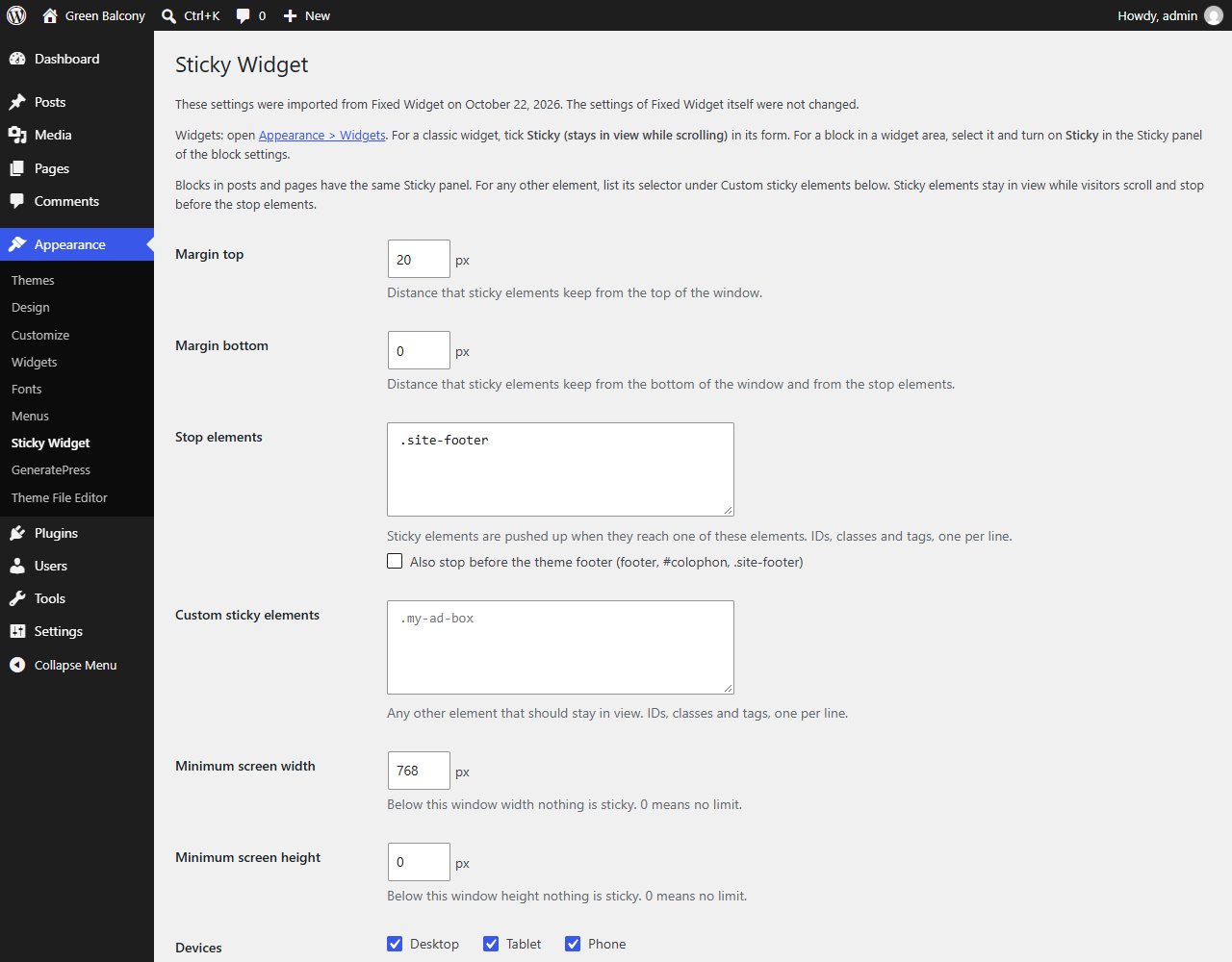
| "Margin Top", "Margin Bottom" | Margin top, Margin bottom | Yes, as they are (Fixed Widget's default of 0 stays 0; a new install without Fixed Widget starts with a top margin of 10 px) |
| "Stop Elements" (and the older single "Stop ID" option) | Stop elements | Yes. Like Fixed Widget, a bare name such as colophon is also tried as #colophon. Also stop before the theme footer starts off, because Fixed Widget did not stop there by itself |
| "Custom Fixed Elements" | Custom sticky elements | Yes, including the bare IDs that version 5 accepted |
| "Minimum Screen Width", "Minimum Screen Height" | Minimum screen width, Minimum screen height | Yes |
| "Fixed widget" tick on a classic widget | Sticky (stays in view while scrolling) | Read at display time: a widget ticked in Fixed Widget is sticky without a copy or a click |
Block classes FixedWidget__fixed_widget and FixedWidget__stop_widget | Sticky and Stop here | Read as they are: the blocks stay sticky, or stay stops |
"Improved version" (use_sticky_position) | No switch | Not imported: our script always tries position: sticky first |
logged_in_req (sticky only for logged-in users; no field on the settings page) | Not available | Not imported: elements are sticky for every visitor |
fix-widget-id (no field on the settings page) | Not needed | Not imported: our class goes on the widget wrapper, so the widget ID is not used |
We tested the import with Fixed Widget 6.2.3 installed, active and configured on Twenty Twenty-Five, Astra, Kadence and GeneratePress (blocks marked with its classes on all four, a widget ticked in its form on Astra, Kadence and GeneratePress, and on Twenty Twenty-Five and Astra also a top margin of 25 px and a stop element by selector): the settings came across on activation and, once Fixed Widget was deactivated, the same elements were sticky and stopped at the same places in Chromium, Firefox and WebKit, at zoom levels from 50 to 200% and window widths from 1280 to 800 px.
Moving over, without redoing your settings
- Leave Fixed Widget active for now. If you delete it first, Fixed Widget removes its own settings and there is nothing left to import (the ticks on your widgets and the classes on your blocks would still be read).
- In your dashboard go to Plugins → Add Plugin, search for "Quicksloth Sticky Widget", click Install Now, then Activate. The import happens at this step.
- Open Appearance → Sticky Widget. The first line says "These settings were imported from Fixed Widget on" followed by the date, and the fields show your values. While Fixed Widget is still active, a line on the same page says that our plugin does not move anything yet: two scripts on the same widgets would make them jump.
- In Plugins → Installed Plugins, deactivate Fixed Widget. Our script starts on the next page load; nothing else to click.
- Check a long page of your site: the same widgets stay in view and stop at the same places. If you have a caching plugin, clear its cache first.
- Delete Fixed Widget when you are ready, or keep it deactivated: our plugin never touches its data. To go back, reactivate Fixed Widget and deactivate ours. One limit of going back: a block you switched off in our Sticky panel still carries Fixed Widget's class, so Fixed Widget makes it sticky again.
- If your CSS uses
FixedWidget__fixed_widget__pinnedto style an element while it is sticky, it keeps working: our plugin adds that class too, next to its ownqssw-is-pinned.
Try it
Read what the plugin does, what it does not do and how to set it up, the common questions, or how to make a widget sticky in WordPress, with and without a plugin. Questions about your own setup: support@quicksloth.dev. This plugin is not affiliated with Fixed Widget or its authors.