 Quicksloth
How to make a wedding seating chart in a spreadsheet (Excel or Google Sheets)
Last updated: 30 October 2026 · By Quicksloth
A seating chart is a guest list with one more column: the table. A spreadsheet is good at the part that goes wrong on paper, the counting. It tells you how many seats each table has left, warns you when one is too full, and checks that everyone who said yes has a seat. Here is how to set one up, how many people fit at each table size, and a made-up 70-guest wedding worked through, including the table that ends up one seat over.
Short version: wait for most RSVPs, then start with your own table and your families. Give every guest row a seat count (1, or 2 with an unnamed plus-one, 0 for a no) and a table number. Add the seats per table with SUMIF and subtract them from the capacity: a negative number means someone has to move. Sort the list by table for the venue, and by name for the escort cards.
The guests and numbers on this page are a made-up example, from the example file of our Wedding Guest List & Seating spreadsheet. Your venue's, caterer's and rental company's own limits and deadlines come first.
Seating chart, escort cards, place cards
Three words that get mixed up. A seating chart (the display or sign at the entrance) lists the guests and their tables. Escort cards do the same job one card per guest: in Paperlust's words, they are "individual cards at the entrance with each guest's name and table number". Place cards go one step further and give each guest a seat. As Joy puts it, "escort cards get your guests to their table and place cards get them to their seat" (Paperlust, 18 June 2026, updated 2 October 2026; Joy, last updated 17 August 2020; both read on 29 October 2026).
Most couples assign tables, not seats. Joy notes that with a buffet "you may not need to assign seats for each guest". The spreadsheet below works by table; for place cards you would add a seat number, but the counting stays the same.
When to make it
You can sketch the family tables early, but the chart is finished only once you know who is coming. Zola puts it as "Once you receive those RSVPs, though, it's time to start mapping out your wedding seating chart" (Zola, last updated 31 July 2024). The dates around it, from the sources we read on 29 October 2026, which do not all agree:
- RSVP deadline: "The standard practice is to set your deadline three to four weeks before the wedding" (Joy's glossary). Paperlust, a stationery shop, places it earlier: "Start after your RSVP deadline, typically 6-8 weeks before the wedding". Our wedding planning checklist sits in between, at 4 to 5 weeks.
- Final numbers: "Caterers, rental companies, and venues typically require a final headcount one to two weeks before the event" (Joy). Paperlust says most caterers ask for the final count per table "2 weeks before the wedding".
- Printing: a printed display takes time. Paperlust writes that "Most printers need 7-10 business days minimum", so a late change may not make it onto the sign.
In our checklist the seating plan starts 7 weeks before, missing RSVPs are chased at 4, and the chart is printed at 2. Your caterer's contract sets the real deadline.
How many guests fit at a table
The capacity you type into the sheet comes from your tables. Rental companies give ranges, and they do not agree, so here are two of them, both read on 29 October 2026:
| Table | Chivari | Hill Country Event Rentals |
|---|---|---|
| 48" round | 4–6, "comfortably" | 4–6 |
| 60" round | 8 "comfortably", 8–10 adults in its size list | 6–8 |
| 72" round | "up to 10 -12" | 8–10 |
| 6 ft rectangular (banquet) | 6–8 adults (72" long) | 6–8 |
| 8 ft rectangular (banquet) | 8–10 adults (96" long) | 8–10 |
Sources: Chivari, Pro Table Seating Guide (undated), which adds that 10 chairs at a 60" round "would be rather intimate"; Hill Country Event Rentals, Table Rental Guide (1 July 2026), which notes that "Actual seating capacity may vary depending on chair style, place settings, and event layout." Plan on the lower number for a plated dinner, and use your own rental company's chart: it is the one that counts.
Set up the sheet: seats, tables, free seats
Start from the guest list you already use for RSVPs, one row per person. Three columns do the seating:
- RSVP (column H in our file): Pending, Yes or No, from a drop-down.
- Table (column K): the table number. Type it when the guest says yes; nothing else is needed.
- Seats (column N, calculated): 1 for a yes, 2 for a yes with a plus-one whose name you don't know yet, 0 otherwise. Once you know the plus-one's name, give them their own row and set Plus-one back to No.
Next to the list, a small table board: one row per table, with its number in P, the capacity in R, and two formulas. These are the formulas of our file, row 7 being table 1:
Seats (guest in row 7)    =IF($A7="","",IF($H7="Yes",1+IF($F7="Yes",1,0),0))
Seats used (table in P7)  =SUMIF($K$7:$K$506,$P7,$N$7:$N$506)
Free                      =$R7-$Q7
Seated / confirmed        =SUM($Q$7:$Q$36)&" / "&$C$4
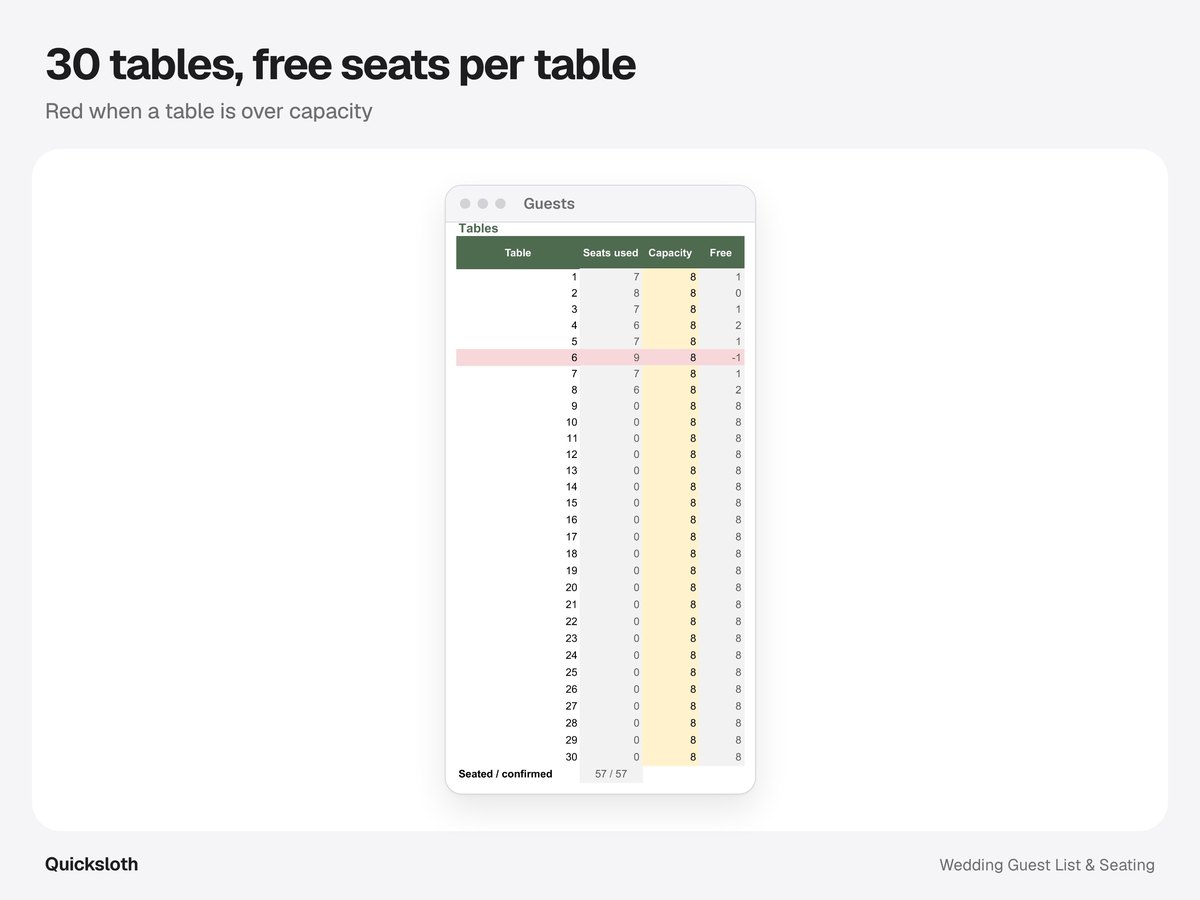
Because a guest who declines has 0 seats, their table frees up by itself, even if their table number stays. In our file a conditional format turns a table's row red when Free is below 0. The last line compares the seats placed at tables 1 to 30 with the seats confirmed (cell C4, the sum of the Seats column): when the two numbers differ, someone who said yes has no table yet, or has a table number outside the board.
The example: 59 seats, 9 tables, one too full
The example file is a made-up 70-guest wedding: 60 rows, 67 people invited with the plus-ones, 8 declines and 59 seats confirmed, at nine round tables of 8 (72 seats). Partner 1's guests sit at tables 1 to 5, family first (the Bennetts at table 1, the Clarkes and the Reids with their children at table 2), and Partner 2's at tables 6 to 9. The board, recalculated on 30 October 2026:
| Table | Seats used | Capacity | Free | After the move |
|---|---|---|---|---|
| 1 | 5 | 8 | 3 | 3 |
| 2 | 7 | 8 | 1 | 1 |
| 3 | 6 | 8 | 2 | 2 |
| 4 | 6 | 8 | 2 | 2 |
| 5 | 6 | 8 | 2 | 2 |
| 6 | 7 | 8 | 1 | 1 |
| 7 | 9 | 8 | −1, in red | 0 (8 used) |
| 8 | 7 | 8 | 1 | 1 |
| 9 | 6 | 8 | 2 | 1 (7 used) |
Table 7 has 9 seats for 8 chairs: seven rows, two of them with a plus-one whose name is still "Partner (name TBD)". "Seated / confirmed" reads 59 / 59, so the problem is not a missing guest but a full table. The fix is to move one person to a table with room. We moved Marco Rossi, a colleague of Partner 2 (the only work guest at table 7), to table 9 by typing 9 in his Table cell. Table 7 went to 8 of 8, table 9 to 7 of 8, and "Seated / confirmed" stayed at 59 / 59. Thirteen seats are still free across the nine tables, room for a few late yeses.
Who to seat first
The order matters more than any formula: place the people with the fewest options first, then fill in around them. From Zola's guide (read on 29 October 2026):
- Your own table first. "It's a good idea to seat the two of you first at your wedding table", at a head table with the wedding party or a sweetheart table for two; with a sweetheart table, "you can place the wedding party at one or two other tables nearby".
- Parents and grandparents next. "It's common for both sets of parents to share a table at the reception." If things are strained, Zola suggests "letting each parent host their own table (if space allows)" and keeping those tables "equally close to yours".
- Friends together, groups mixed. "sit your close friends together—and definitely mix them in with your partner's BFFs, too."
- No singles table. Zola's advice is to "skip the singles' table altogether": it "could be embarrassing for your guests once they realize where they landed".
For the rest, Paperlust suggests seating older guests and guests with mobility needs "near the entrance, away from speakers". In the sheet, a Group column (family, friends, work) makes this faster: sort or filter by it and you see each group's size before you split it across tables.
Lists for the venue and the escort cards
Two printouts come out of the same list. Sort only the guest columns (A to N in our file), with the header row marked as headers, so the table board next to them stays as it is:
- By table, for the venue and the caterer: sort by Table, then by Name. Each table's guests come together, with the meal and dietary needs on the same row. Paperlust's list of what to send the caterer is exactly that: table number, guests at each table and dietary needs.
- By name, for the escort cards or the sign: sort by Name. Joy's tip: "always display your escort cards in alphabetical order".
In Excel the command is Data → Sort (tick My data has headers); in Google Sheets, Data → Sort range → Advanced range sorting options (tick Data has header row). A filter on the header row also works to look at one table, but it hides whole rows of the sheet, and in our file the table board sits in those rows too: clear the filter to see the board again.
Guests who declined have no table and sort to the end of the list by table; leave them out of the printout. Plus-ones still without a name have no row of their own, so check the Plus-one column before you write the escort cards.
Do it in a spreadsheet
Everything on this page is in our Wedding Guest List & Seating spreadsheet, for Excel and Google Sheets: up to 500 guests, RSVP, meal and plus-one drop-downs, the table board for 30 tables with the red warning, the seated / confirmed check, venue capacity on the first tab and a thank-you column for after the wedding. It comes with the example used on this page, and is available in our Etsy shop. It is a board of numbers, not a drawn floor plan: where the tables go in the room is up to you. For the RSVP and meal formulas see how to track wedding RSVPs in a spreadsheet; if you also need a checklist and a budget, our Simple Wedding Planner has the same Guests tab with a 20-table board.
The guests, replies and numbers are made up, from the example file of our Wedding Guest List & Seating spreadsheet; the move of one guest was made in a copy of it and recalculated in LibreOffice Calc on 30 October 2026, and the board before the move matches the one recalculated in LibreOffice for our RSVP guide. Quotes come from the pages linked, read on 29 October 2026. We used AI tools to help write this article and the formulas; every number was recalculated and checked against the file.