 Quicksloth
Free wedding budget spreadsheet for Excel and Google Sheets
Last updated: 1 November 2026 · By Quicksloth
One tab, nothing to set up: type your total budget, then what you expect to spend, what you actually spent and what you've paid for each item. The sheet adds it all up and tells you what is still to pay and how much of your budget is left.
Download the free spreadsheet (.xlsx)
Free, no sign-up and no email needed. It's a single .xlsx file (about 10 KB) that opens in Excel, Google Sheets and LibreOffice.
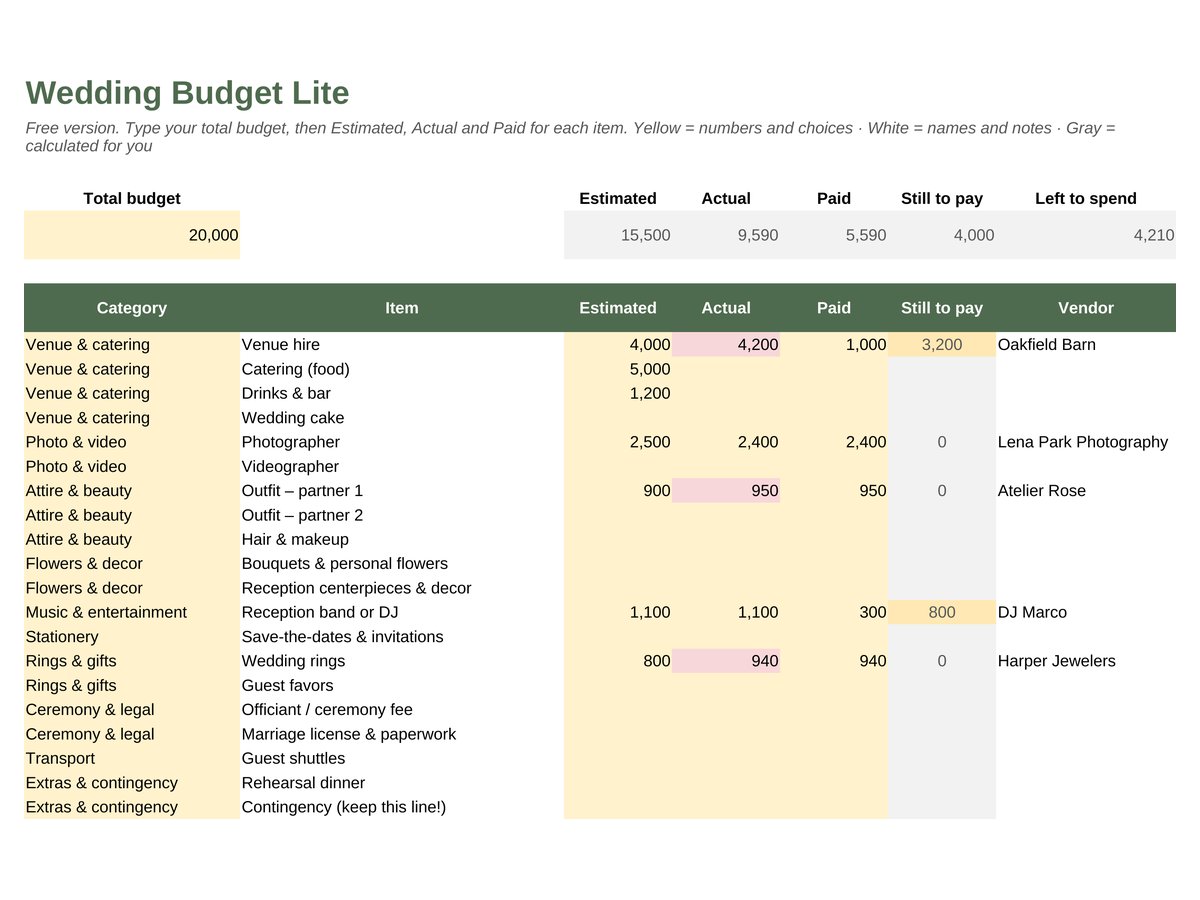
In the picture we typed a few numbers so you can see the colors; the file you download is blank.
What's in it
- 20 common items in 10 categories, already listed: venue and catering, photo and video, attire and beauty, flowers and decor, music, stationery, rings and gifts, ceremony and legal, transport, extras and contingency. Rename or delete any of them.
- 40 rows in all: the 20 items plus 20 empty rows for your own, with the category picked from a drop-down.
- Estimated, Actual and Paid on every line, with Still to pay worked out for you, plus the vendor and a note.
- Totals at the top and Left to spend: your total budget minus each item's actual cost, or its estimate while there's no actual cost yet.
- Colors that warn you: red when an item costs more than you estimated or the budget goes below zero, amber when something is still to pay.
- Prints on one page, Letter or A4, landscape.
How to use it
- Download the file and open it in Excel, or in Google Sheets with File → Import → Upload (choose "Replace spreadsheet" or "Insert new sheet").
- Type your total budget in the yellow cell at the top left.
- Fill in Estimated as quotes come in, then Actual when you book and Paid when you pay a deposit or a balance.
- Watch Still to pay and Left to spend. Add items in the empty rows inside the table, so the totals include them.
Free version or full version?
This free sheet tracks the numbers you type. Our Simple Wedding Budget starts earlier: you type your total and your guest count, and it suggests an amount for each of 31 items from typical shares, shows the cost per guest for catering, drinks, cake and favors, adds a total for each category and a Start Here tab with a summary, and comes with a filled-in example. If you also want a dated checklist, a guest list with tables and a wedding-day timeline, the same Budget tab is inside the Simple Wedding Planner.
- Full budget: Simple Wedding Budget on Etsy
- Everything in one file: Simple Wedding Planner on Etsy
Want to see a whole budget worked out? Wedding budget breakdown: a worked example with deposits and due dates follows a 70-guest wedding line by line.
Questions and answers
- Is it really free?
- Yes. Download it, use it for your own wedding and change anything you like. If you want to share it, please share the link to this page rather than the file, so people always get the latest version. It's for personal use: please don't resell it.
- Do I need Excel?
- No. The same file works in Google Sheets, which is free with a Google account, and in LibreOffice Calc. It only uses SUM, IF and ISNUMBER, so nothing shows #NAME? after import. No macros and no add-ons.
- Can I change the currency?
- The amounts are plain numbers, so they work in any currency. Type them in yours.
- I typed a word in an amount cell and it turned red.
- The amount columns take numbers only; Excel refuses text there, and if text gets in anyway (for example pasted in Google Sheets) the cell turns red and is left out of the totals. Type the number, and put words in the Notes column.
- How was it made?
- Designed and built by Quicksloth. We used AI tools to help write the formulas, the code that generates the file and these texts; every formula is then recalculated and checked automatically, and the file is opened and tested in LibreOffice.
Help
Something doesn't work? Write to support@quicksloth.dev and tell us whether you use Excel or Google Sheets and what you see. More in Help, the license and your data.